MCP is a way for an AI app to use tools
MCP is a protocol for AI applications to discover and call external tools. The useful question is not what the letters stand for but which AI can use which tool. After connecting, you can ask the AI to save or find a record.
The connection does not make the AI remember every conversation or move it automatically. You still choose permissions and the content to save.
From connection to a first record
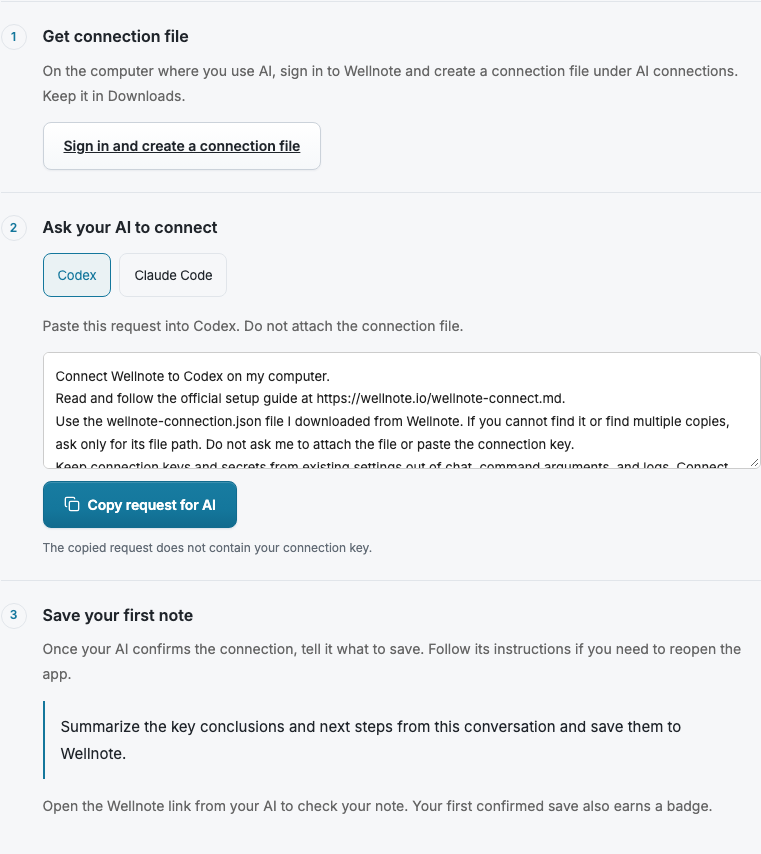
The image below shows the current public Wellnote connection guide. It puts the connection file, AI instruction, and first save in one sequence. The wording may change as the product evolves.
Never paste the connection file or key into a chat. Prompt read and write permissions are separate choices. A successful connection is only the start; make a small first save and open the result to check the flow.
- Sign in to Wellnote and open AI connection.
- Choose Codex or Claude Code, then select the read and save permissions you need.
- Keep the downloaded connection file on your computer and give the displayed instruction to the AI.
- Verify the connection, then ask 'Save this result to Wellnote' during real work.
Aim for a first save, not a vocabulary test
Wellnote currently guides Codex and Claude Code running on the same computer. Save one small document, open it in Wellnote, and then add other permissions if needed.